See the document page by page
Organize Pages presents visual previews so you can identify the page you need without guessing from a page number alone. Selected pages receive a clear highlighted state.
Put every page in its place
Extract, reorder, insert or delete pages, merge multiple PDFs and save a clear modified copy from the same document library.

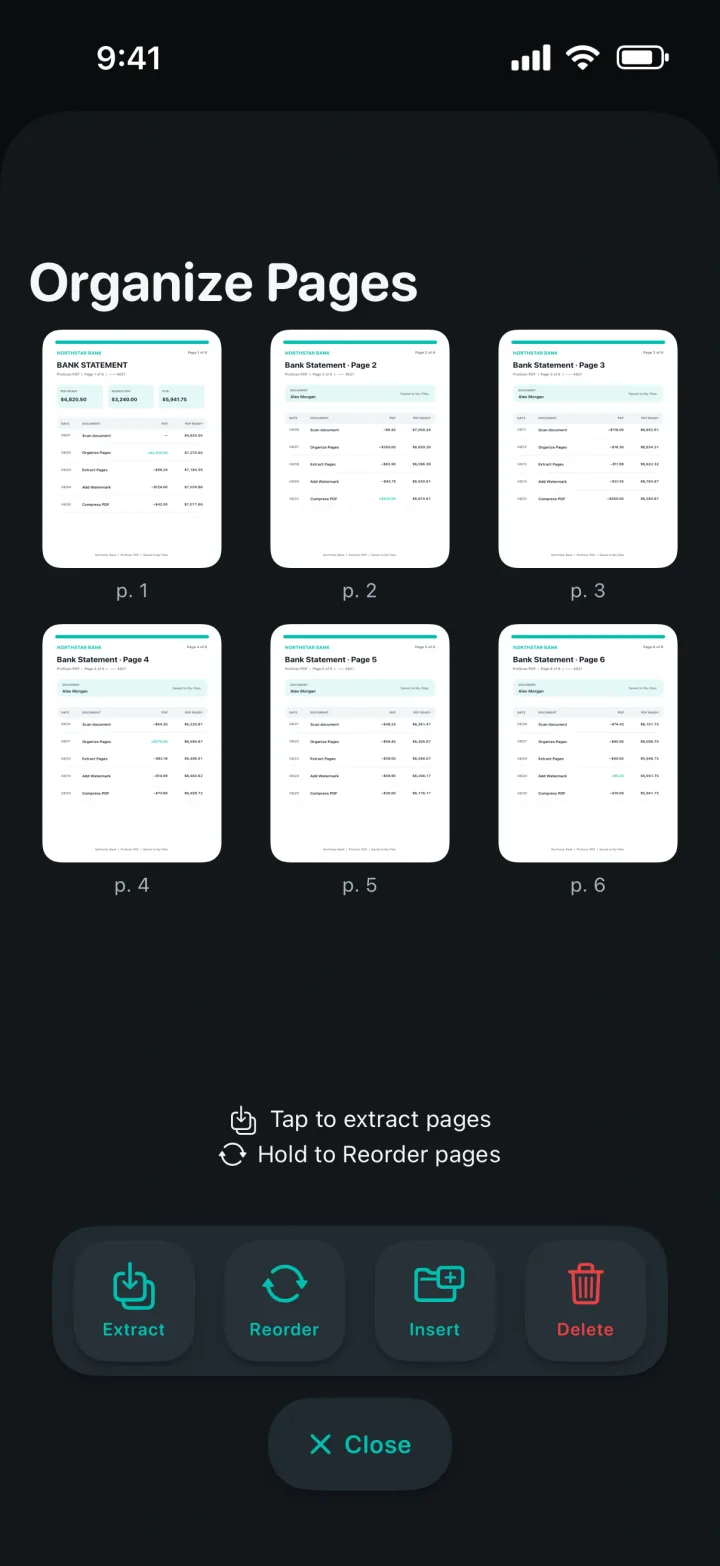
Organize Pages presents visual previews so you can identify the page you need without guessing from a page number alone. Selected pages receive a clear highlighted state.
Select only the relevant pages and save them as a new extracted document. The original PDF stays available while the smaller result appears in My Files.
Reorder pages, insert pages from another source or remove pages that should not remain. Save the modified PDF when the sequence is ready.
A clear three-step workflow
ProScan PDF keeps the action, confirmation and saved file inside one focused workflow.
Choose a PDF from My Files and tap Organize. Page previews appear in a dedicated workspace with Extract, Reorder, Insert and Delete actions.
Use selection for extraction or deletion, drag pages while reordering, or insert additional content. The interface keeps the operation visible so the result is easier to predict.
Save extracted pages as a new PDF or save the modified document after reorder, insertion or deletion. A completion card confirms that the file was created successfully.
Built for practical documents
When only a few pages matter, extraction creates a concise PDF that is easier to share. It is useful for selected contract pages, one chapter, a receipt inside a larger scan or the relevant pages of a report.
Selection mode supports combining multiple PDFs into one result. Choose the files, use Merge and save the new document without relying on an external upload-and-download service.
Deleted cards fade out and remaining files move into place with a controlled animation. Refreshes are coalesced so the library does not perform duplicate scans or replay the movement after one operation.
Questions, answered
Practical details about how this feature works in ProScan PDF.
Yes. Select the pages you need and save them as a new extracted PDF.
Yes. Choose Reorder, arrange the page previews and save the modified PDF.
Yes. Use Select in My Files, choose the PDF files and tap Merge to create one combined document.
No. Extraction, reordering, insertion, deletion and merging are performed locally.
Continue the workflow
Your next document is one tap away
No ads. No watermarks.